You can now disable the CVV and/or ZIP code requirement for Key-In / Card Not Present Online Ordering transactions.
Supported gateways:
CardConnect
TSYS
Converge*
SeamlessPay*
*These processors require additional configuration within their admin portals to disable CVV and ZIP code validation. Please contact your credit card processing provider to adjust these settings.
Use Case:
For example, international tourists often lack a U.S. ZIP code for their credit card payments, which can cause issues when placing orders via key-in or online transactions. This article explains how merchants can resolve this by adjusting the CVV and ZIP code requirements to accommodate such scenarios.
How to Enable or Disable CVV and ZIP Code
[1] Go to Figure Manage > Settings > Payment
[2] Choose Card Processing & Gateways
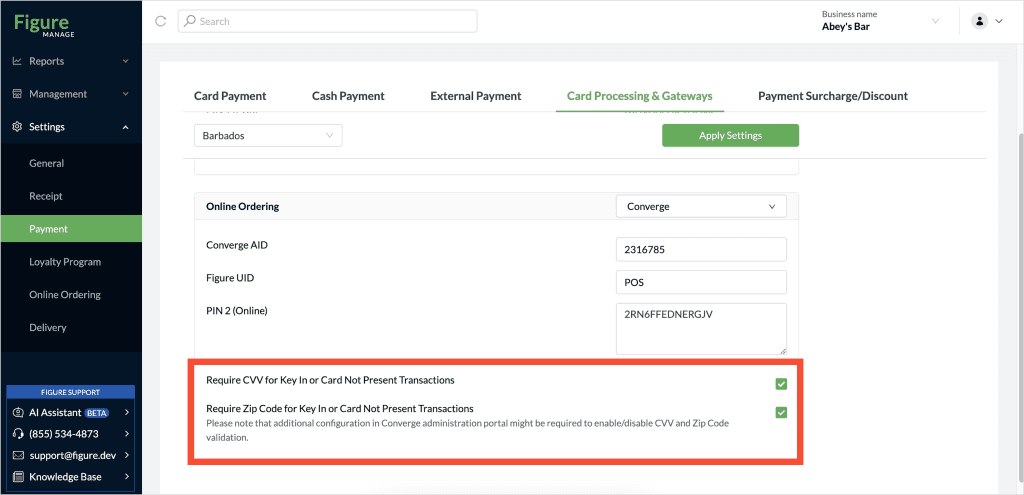
[3] Under the Online Ordering section, you’ll find two new settings:
✅ Require CVV for Key-In or Card Not Present Transactions
✅ Require ZIP Code for Key-In or Card Not Present Transactions
By default, both settings are turned ON – to require both CVV and ZIP Code
💡 These settings only apply to Make It Butter in the browser (for both desktop and mobile) — not to Mobile Ordering application.