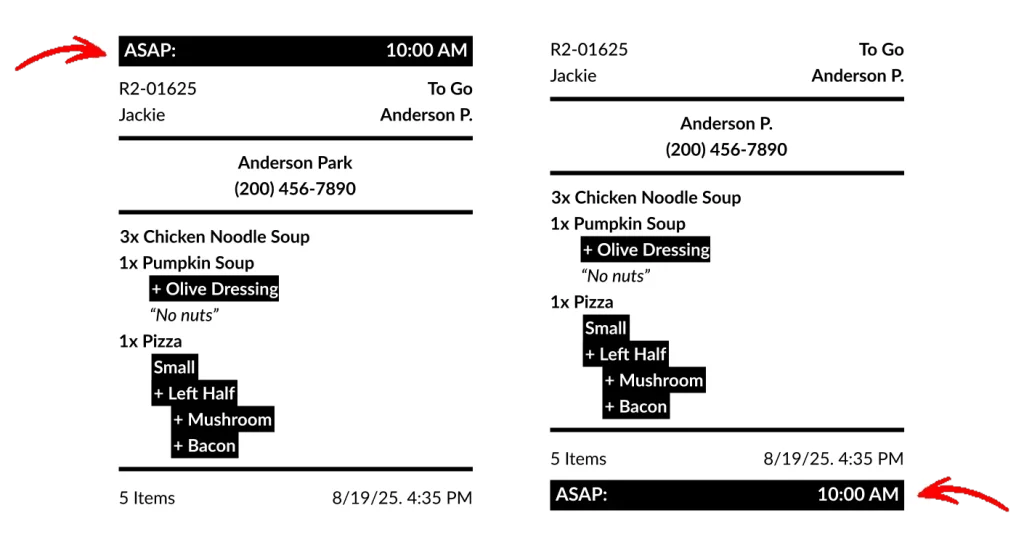
The Estimated Ready Time is automatically displayed on sales and kitchen receipts for future or scheduled orders.
You can also enable Estimated Ready Time printing for ASAP orders, making it easier to quickly identify when each order is expected to be ready. Additionally, you can choose whether the ready or scheduled time appears at the top or bottom of the receipt, providing greater flexibility to suit your operational preferences.
Enable displaying the Estimated Ready Time for ASAP orders
[1] Go to Figure Manage > Settings > Receipt
[2] Select Sales Receipt or Kitchen / Order Receipt tab
[3] Enable the Display Estimated Ready Time for ASAP Orders
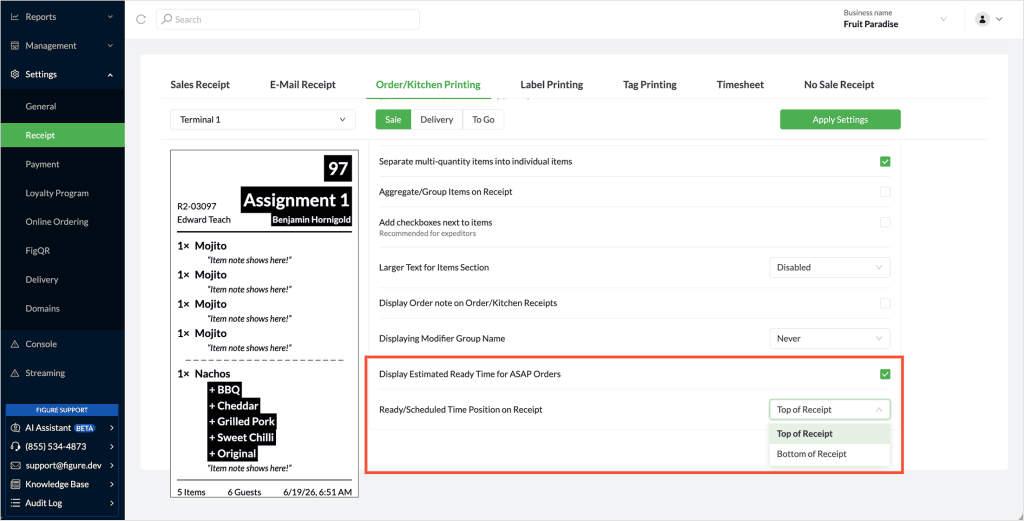
Select a position for the Estimated Ready Time on receipts
[1] In not already there, go to Figure Manage > Settings > Receipt
[2] Select Sales Receipt or Kitchen / Order Receipt tab
[3] On the line with “Ready/Scheduled Time Position on Receipt”, select one of the options: Top of Receipt / Bottom of Receipt