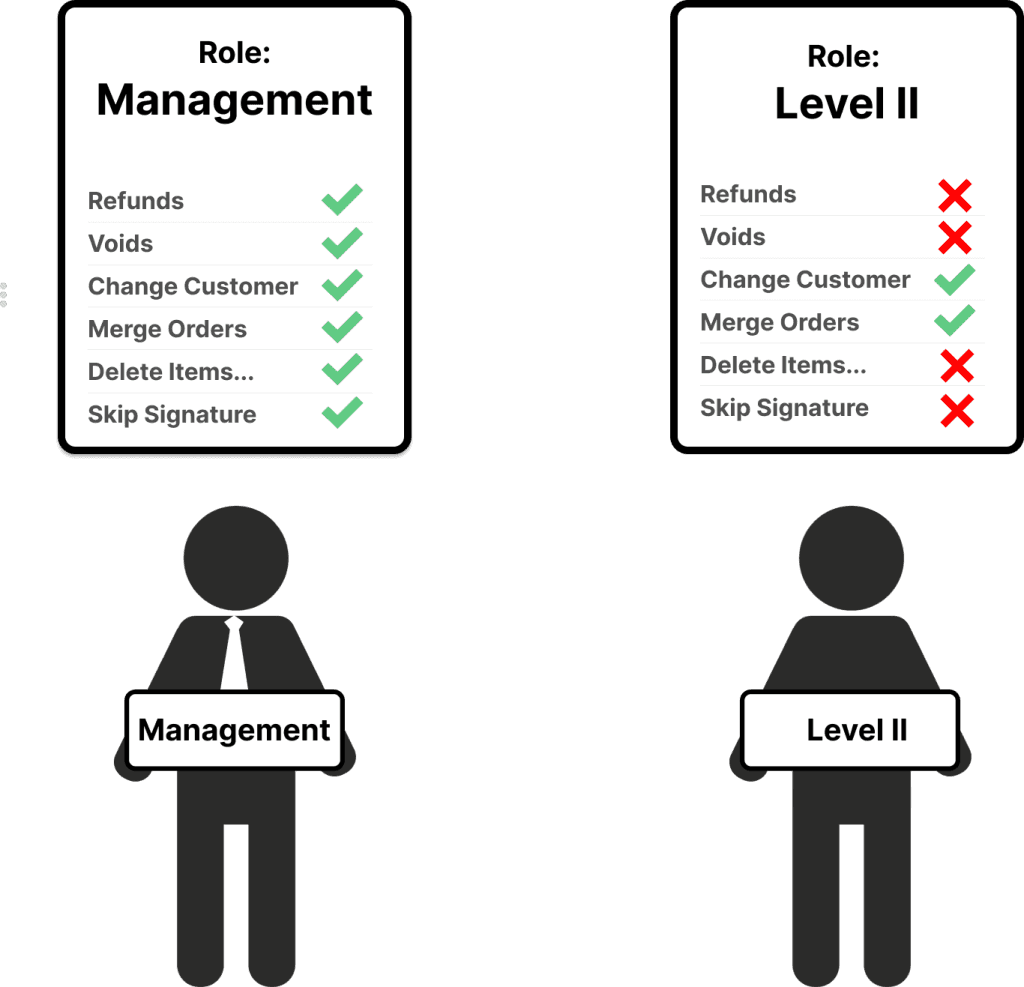
With multiple employees, you might not always want all employees to have access to all parts of the system. You can assign different Roles / Access Levels to your employees and different permissions to each role / access levels.
How permissions work
In Figure Manage, you have the ability to create Roles (Access Levels) as sets of permissions that are then assigned to individual employees.
Each Role have a specific permission set by default. Administrators can always adjust permissions for each role as needed, or create a brand new custom Role.
Some permissions restrict the action completely and some actions can still be executed by swiping an employee card or inputting a PIN of an employee that has the permission to execute the action – see more in the List of permissions below.
Example: this signed in employee does not have the permission to do cash payments. A manager's PIN is needed to proceed with the cash payment:
List of permissions:
Permission | Description | Applies To | Always actionable with mng's PIN |
|---|---|---|---|
Clock In/Out | Allows to clock in / out | POS | ✖ |
Breaks | Allow role to clock in/ou of breaks | POS | ✖ |
Register | Allows access to Register (iPad) | POS | ✔ |
Operations | Allows access to Operations agenda | POS | ✖ |
Settings | Allows access to Settings agenda | POS | ✖ |
Reports | Allows access to Reports agenda | POS | ✖ |
Limit access to Daily 'Summary Report' & seeing reports for signed in employee | The employee can see only Daily Summary report, not other reports. In the Summary, the role cannot see records for other employees. | POS | ✖ |
Figure Manage | Allows access to Figure Manage | Figure Manage | ✖ |
Menu Configuration | Allows access to Configuration agenda | POS | ✖ |
Employee Status | Allows access to see employee status in POS > Menu > Status > Employee | POS | ✖ |
Employees | Allows access to see Employees agenda | Figure Manage | ✖ |
Roles & Access | Allows access to Roles & Access screen | Figure Manage | ✖ |
Numerical Input | Allow access to the Numerical Sales in Figure Register | POS | ✔ |
Virtual Till | Allow access to Virtual Till | POS | ✖ |
Orders Assigned to Others | Allow access to orders that are assigned to different employees | POS | ✖ |
Past Orders | Allow access to orders created prior to the current date | POS | ✖ |
Actions | |||
Special Pricing | Allow roles to apply or approve price modifications | POS | ✔ |
Ability to apply Discounts | Allow adding item or order level discounts | POS | ✔ |
Ability to apply Premiums | Allow adding item or order level premiums | POS | ✔ |
Ability to apply Custom Pricing | Allow adding custom discounts or premiums | POS | ✔ |
Ability to apply Gratuity | Allow adding gratuity | POS | ✔ |
Ability to apply Custom Gratuity | Allow adding custom gratuity amount | POS | ✔ |
Taxes | Allows role to change tax rate | POS | ✔ |
Refunds | Allow role to refund orders or to approve refund requests. | POS | ✔ |
Voids | Allow role to void orders or to approve void requests | POS | ✔ |
External NEW | Allow role to perform or to approve external payments | POS | ✔ |
Cash Payment | Allow role to perform Cash Payments | POS | ✔ |
No Sales | Allow role to perform 'No Sale' transactions | POS | ✔ |
Disable employee from seeing a cash balance | Disallow role to see the cash balance in No Sale agenda. | POS | ✖ |
Change Assignee | Allow role to change assignee in an order. | POS | ✔ |
Change Assignment | Allow role to change assignment in an order. | POS | ✔ |
Change Customer | Allow role to change customer in an order. | POS | ✔ |
Skip Signature | Allow role to skip signature screen. | POS | ✔ |
Service | Allows role to activate a new location on POS | POS | |
Close Account | coming soon | coming soon | coming soon |
Re-Open Closed Order | Allow role to re-open closed orders | POS | ✔ |
Merge Orders | Allow role to merge orders/tables. | POS | ✔ |
Transfer Items | Allow role to transfer items between orders/tables. | POS | ✔ |
To Be Assigned as a Driver | Allow role to be assigned as a driver | POS | ✖ |
Create Custom Item | Allow role to add Custom Items to order | POS | ✔ |
Adjust Fixed Price | Allow role to adjust price of fixed priced items in POS. (Also, that particlar item has to have this enabled in the item detail in Items & Categories) | POS | ✔ |
Delete Items from Printed Checks | Allow role to delete items from printed checks in POS | POS | ✔ |
Manage Shift Reviews | Allow role to perform Shift Review for others | POS | ✖ |
How to set permissions for a role
[1] Go to Figure Manage -> Management -> Employees -> Roles & Access
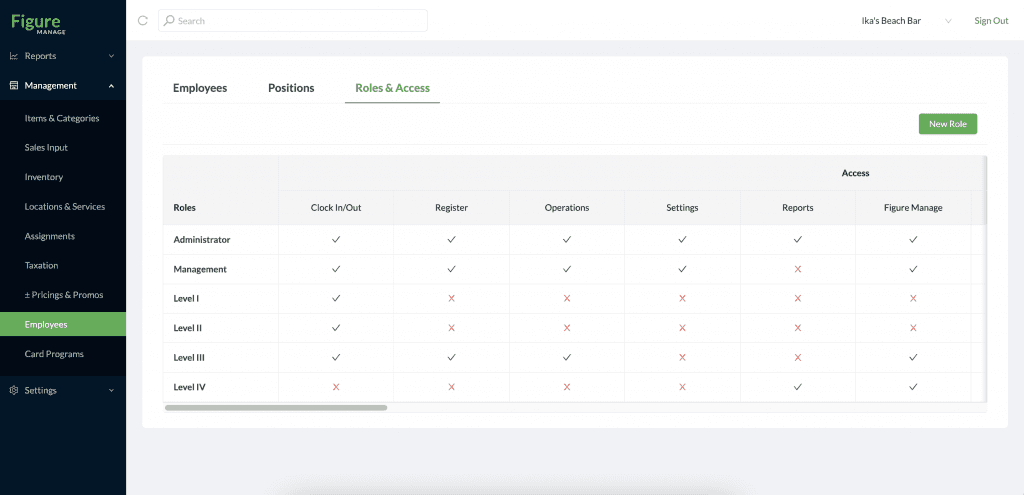
[2] Click on one of the roles (or create a new one by the New Role button)
[3] Adjust permissions
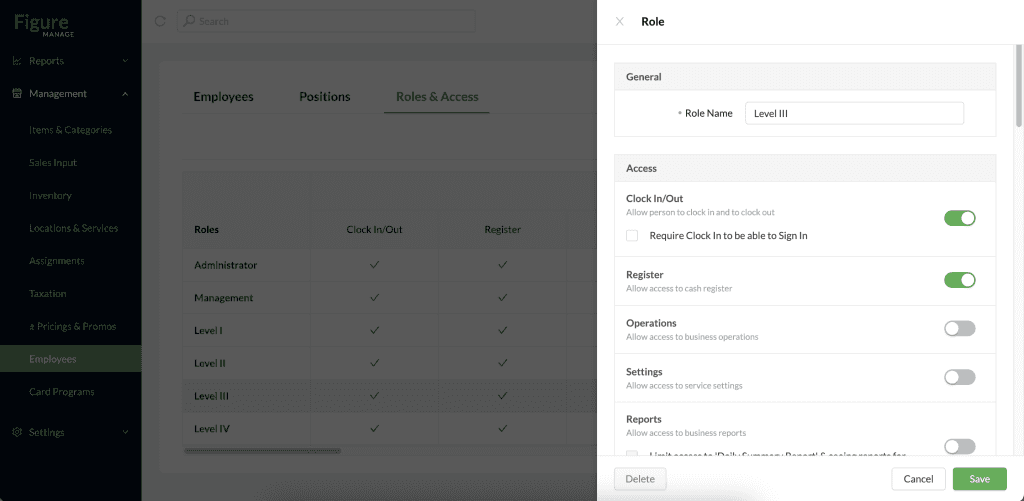
[4] Hit Save
How to assign a Role to an employee
[1] Go to Figure Manage > Management > Employees
[2] Create an employee or click on existing one to edit their Role
[3] In Permissions section, see the Role field – choose the Role you want to assign to this emplyoee
[4] Hit Save
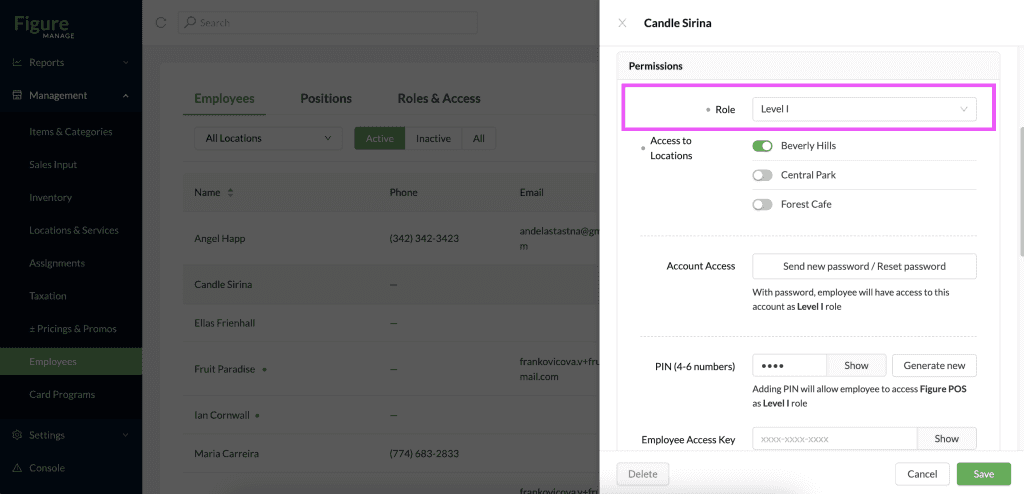
How to grant access to specific locations for an employee
When dealing with multiple business locations, Figure Manage offers the ability to limit an employee's access to specific locations. On the web, the employee will only have access to enabled locations within the dropdown menu. This feature effectively prevents them from making alterations to Items & Categories, adjusting settings, or accessing reports for other locations.
[1] Go to Figure Manage > Management > Employees
[2] Create an employee or click on existing one to edit their Access to Locations
[3] In Permissions section, see the Access to Locations: keep enabled only those that the employee should have access to.
