How to Create an Online Pickup Order with Figure POS

Deborah Lee
Product Manager
This guide shows how to set up branded online ordering and process a pickup order from a customer’s device through to your kitchen display.
Related Figure products


Overview
This guide shows how to set up branded online ordering and process a pickup order from a customer’s device through to your kitchen display.
Step 1: Apply Your Branding
Upload your logo; it displays in the top‑left of the ordering pages.
Choose your color scheme; it applies across the entire ordering flow.
Step 2: Prepare Menu Content
Use high‑resolution images and clear item descriptions.
Add items, images, and descriptions in the Figure back office at figurpos.com.
Step 3: Build the Customer’s Order
Add items to the cart.
Select relevant modifiers (sizes, add‑ons, preferences).
Navigate categories via the menu/navigation bar.
Step 4: Choose Fulfillment
At checkout, select Delivery or Pickup.
For this workflow, choose Pickup.
Step 5: Enter Customer Details
Provide contact information; phone number is required.
Returning customers can log in to their accounts.
Step 6: Verify First‑Time Customers
First‑time customers receive an SMS verification code.
Enter the code to confirm identity and pickup intent.
Step 7: Account Creation (Optional)
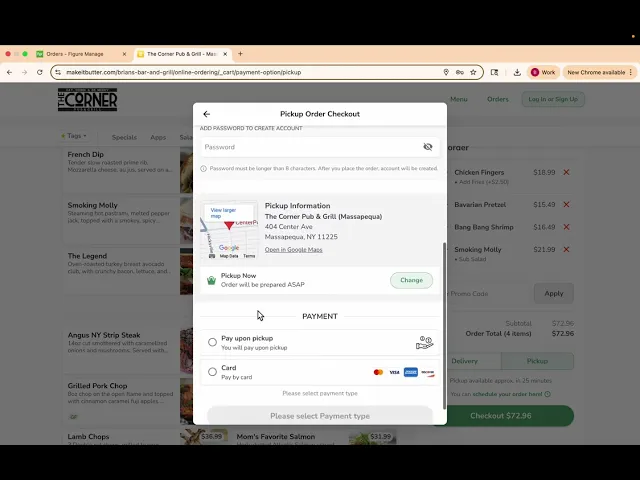
Customers may set a password to create an account.
This step can be skipped.
Step 8: Select Payment
Recommended: pay by card before order creation to secure payment.
Alternative (demo flow): pay upon pickup.
Step 9: Place the Order
Submit the order.
Your iPad terminal will chime and show a yellow “new order” badge.
Step 10: Manage Incoming Orders
Open the order in the POS.
Accept or decline the order.
Optionally add extra prep time during busy periods.
Step 11: Prepare in the Kitchen
Accepted orders appear on the kitchen display in a ticket‑like format with the customer’s name.
Proceed with preparation and pickup handoff.
Notes
Ensure branding assets and images meet quality standards for a professional storefront.
Keep item descriptions specific and concise to reduce customer confusion.
Favor card‑before‑order for reduced no‑shows; use pay‑upon‑pickup where appropriate.