Manage all your menus from one place. With our Grubhub & UberEats integration, it is possible to create and adjust Grubhub & UberEats menus from Figure Manage, eliminating the hassle of configuring them independently on their respective platforms.
If you don't have Grubhub or UberEats integrated with Figure yet, reach out to us at support@figure.dev.
Let's consider that you already added your items and categories in Figure Manage (see how in this article). Now, let's see how to add these items to Grubhub or UberEats platforms via Figure Manage.
First of all, make sure that you have Hours of Operations [HOO] enabled – with disabled HOO, changes will not propagate to Grubhub or UberEats. If HOO are enabled, continue by taking the steps below:
[1] Go to Figure Manage > Management > Sales Input > Online Ordering
[2] In the service picker on the left, select the Grubhub or UberEats API integration service
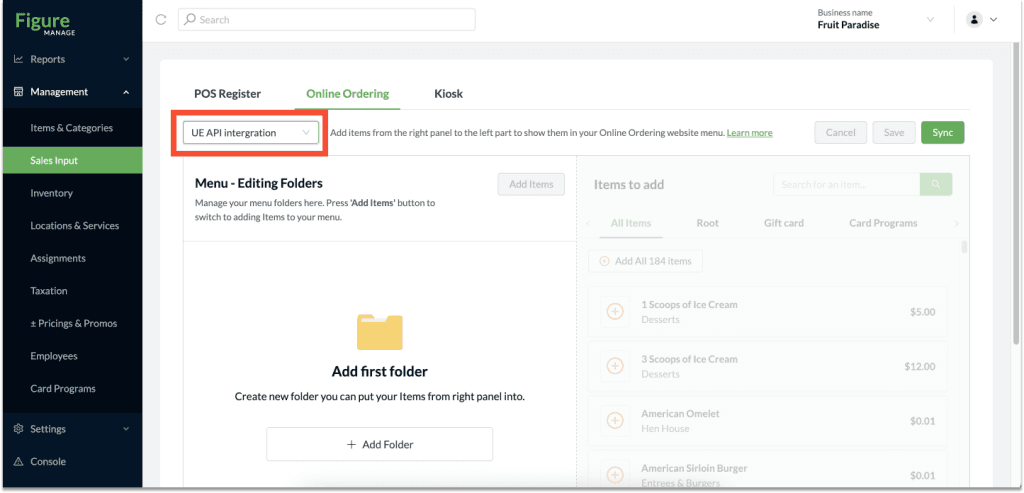
[3] In this step, you can create folders such as Beverages, Lunch, Appetizers, etc. (Steps of adding the folder and items are the same as when creating a sales input for Make It Butter)
[4] When folders are created, click Add Items and add items from the right side to the left side to each folder.
[5] When you are done click Save.
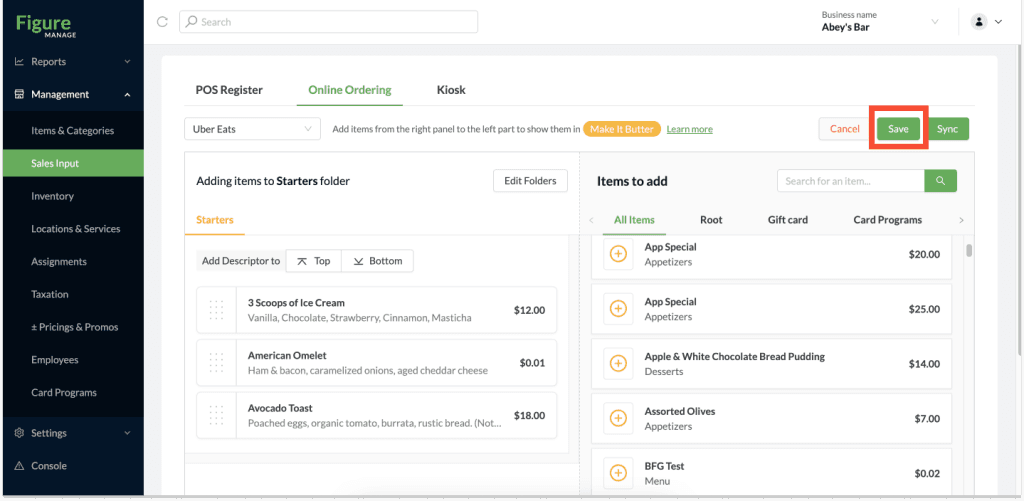
[6] Important!: To make sure this menu is propagated to Grubhub or UberEats website, it is necessary to click the Sync button
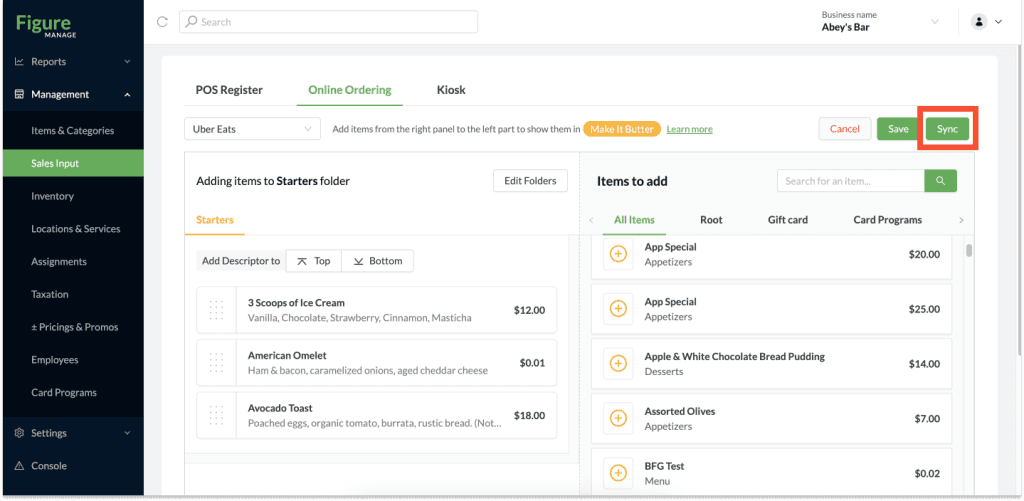
It might take about 10 minutes for the new menu and menu changes to be reflected on the Grubhub or UberEats website.
How to edit Grubhub & UberEats menu
You can always make changes to the Grubhub and UberEats menu.
[1] Go to Figure Manage > Management > Sales Input > Online Ordering
[2] Celect the Grubhub od UberEats menu in the service picker on the left and make any changes
[3] You can remove items, edit folders, add items, reorder items and folders, etc.
[6] Important!: To make sure this menu is propagated to Grubhub or UberEats website, it is necessary to click the Sync button
Please note, if you once synchronize the menu from Figure, you should keep editing the menu via Figure. If you edit the menu on the third party platform, upon next synchronization, the menu created in Figure will override the changes made on the Grubhub or UberEats platform.
What is being synchronized upon using the Sync button
Not only the menu itself is being synchronized with the third party platforms. See the table below that shows what is being synchronized from Figure to Grubhub and UberEats platforms – what is not listed below is not synchronized.
Grubhub | UberEats | |
SALES INPUT | ||
Hours of Availability | synchronized | not synchronized |
Folders | synchronized | synchronized |
Items | synchronized | synchronized |
ITEM DETAIL | ||
Active / Inactive | synchronized | synchronized |
Pricing Type (except Unit Based and Catering) | synchronized | synchronized |
Options | ||
Option | synchronized | synchronized |
Nested Groups | synchronized | synchronized |
Preset | synchronized | synchronized |
Multi | synchronized | synchronized |
Taxes | ||
Tax | synchronized | synchronized |
Active | synchronized | synchronized |
Embed | synchronized | synchronized |
Aggregator Price Overrides | synchronized | synchronized |
Additional info | ||
Product Desrctiption | synchronized | synchronized |
Image | synchronized | synchronized |
Multiple Pieces | synchronized | synchronized |
Contain Alcohol | synchronized | synchronized |
MODIFIERS | ||
Modifier Group | synchronized | synchronized |
Modifier | synchronized | synchronized |
Group Name | synchronized | synchronized |
Active | synchronized | synchronized |
Exclusion | synchronized | synchronized |
Min. Selection | synchronized | synchronized |
Max. Selection | synchronized | synchronized |
Priced as a Group | only if the group price is $0, Grubhub platform does not support this feature fully as it is in Figure | only if the group price is $0, UberEats platform does not support this feature fully as it is in Figure |
LOCATION DETAIL | ||
General Hours of Operations | synchronized | synchronized |
ONLINE ORDERING SETTINGS | ||
Delivery Hours of Operations | synchronized | synchronized |
Pickup Hours of Operations | synchronized | synchronized |
PRICE ELEVATION | ||
Configured in the integration's service detail (Location & Service) | synchronized | synchronized |
Configured in the item detail | synchronized | synchronized |
Examples of what is NOT synchronized that you should be aware of:
Special Pricings (discounts)
Temporary Hours of Operations
Item / Modfier Group / Modifier display name
Tips what to see next:
Price Overrides for Grubhub & UberEats: Adjust item prices for your Grubhub and UberEats platforms relative to the prices set on POS or Make It Butter. Adjust prices individually or apply percentage increases across the menu with ease. Manage it all seamlessly on Figure Manage and sync directly to your aggregators.